 CS2
CS2 Dota 2
 LoL
LoL Valorant
 OW
OW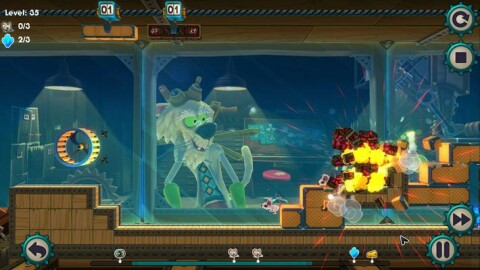
MouseCraft System Requirements
Minimum on Windows:
- OS
- Windows XP SP2 or later
- Processor
- 1.4Ghz or Higher
- Graphics
- OpenGL 2.0 compatible video card with 256 MB shared or dedicated RAM (ATI or NVIDIA)
- Memory
- 512 MB RAM
- Storage
- 1200 MB available space
These are the requirements the publisher lists on Steam.
| Component | Minimum | Recommended |
|---|---|---|
| OS | Windows XP SP2 or later | |
| Processor | 1.4Ghz or Higher | 1.6Ghz or Higher |
| Graphics | OpenGL 2.0 compatible video card with 256 MB shared or dedicated RAM (ATI or NVIDIA) | OpenGL 2.0 compatible video card with 512 MB shared or dedicated RAM (ATI or NVIDIA) |
| Memory | 512 MB RAM | 1 GB RAM |
| Storage | 1200 MB available space | 1500 MB available space |
Publisher notes
- Minimum and recommended
- Version 9.0c
| Component | Minimum | Recommended |
|---|---|---|
| OS | 10.6 Snow Leopard or later | |
| Processor | Intel Mac | |
| Graphics | OpenGL 2.0 compatible video card with 256 MB shared or dedicated RAM (ATI or NVIDIA) | OpenGL 2.0 compatible video card with 512 MB shared or dedicated RAM (ATI or NVIDIA) |
| Memory | 512 MB RAM | 1 GB RAM |
| Storage | 1200 MB available space | 1500 MB available space |
| Component | Minimum | Recommended |
|---|---|---|
| OS | Ubuntu 12.04 32-bit or Ubuntu 12.10 32-bit | |
| Graphics | OpenGL 2.0 compatible video card with 256 MB shared or dedicated RAM (ATI or NVIDIA) | OpenGL 2.0 compatible video card with 512 MB shared or dedicated RAM (ATI or NVIDIA) |
| Memory | 512 MB RAM | 1 GB RAM |
| Storage | 1200 MB available space | 1500 MB available space |
MouseCraft: questions
What are the minimum system requirements for MouseCraft on Windows?
OS: Windows XP SP2 or later; Processor: 1.4Ghz or Higher; Graphics: OpenGL 2.0 compatible video card with 256 MB shared or dedicated RAM (ATI or NVIDIA); Memory: 512 MB RAM; Storage: 1200 MB available spaceFrom the Windows table above
What are the recommended system requirements for MouseCraft on Windows?
OS: Windows XP SP2 or later; Processor: 1.6Ghz or Higher; Graphics: OpenGL 2.0 compatible video card with 512 MB shared or dedicated RAM (ATI or NVIDIA); Memory: 1 GB RAM; Storage: 1500 MB available spaceFrom the Windows table above
What are the minimum system requirements for MouseCraft on macOS?
OS: 10.6 Snow Leopard or later; Processor: Intel Mac; Graphics: OpenGL 2.0 compatible video card with 256 MB shared or dedicated RAM (ATI or NVIDIA); Memory: 512 MB RAM; Storage: 1200 MB available spaceFrom the macOS table above
What are the recommended system requirements for MouseCraft on macOS?
OS: 10.6 Snow Leopard or later; Processor: Intel Mac; Graphics: OpenGL 2.0 compatible video card with 512 MB shared or dedicated RAM (ATI or NVIDIA); Memory: 1 GB RAM; Storage: 1500 MB available spaceFrom the macOS table above
What are the minimum system requirements for MouseCraft on Linux?
OS: Ubuntu 12.04 32-bit or Ubuntu 12.10 32-bit; Graphics: OpenGL 2.0 compatible video card with 256 MB shared or dedicated RAM (ATI or NVIDIA); Memory: 512 MB RAM; Storage: 1200 MB available spaceFrom the Linux table above
What are the recommended system requirements for MouseCraft on Linux?
OS: Ubuntu 12.04 32-bit or Ubuntu 12.10 32-bit; Graphics: OpenGL 2.0 compatible video card with 512 MB shared or dedicated RAM (ATI or NVIDIA); Memory: 1 GB RAM; Storage: 1500 MB available spaceFrom the Linux table above
Are there system requirements for MouseCraft on macOS?
Yes: the source lists requirements for macOS, and they are in the macOS table above.From the platforms the source describes
Are there system requirements for MouseCraft on Linux?
Yes: the source lists requirements for Linux, and they are in the Linux table above.From the platforms the source describes
How much storage does MouseCraft need?
Windows, Minimum: 1200 MB available space; Windows, Recommended: 1500 MB available space; macOS, Minimum: 1200 MB available space; macOS, Recommended: 1500 MB available space; Linux, Minimum: 1200 MB available space; Linux, Recommended: 1500 MB available spaceFrom the Storage row above
Languages
| Language | Full audio | Subtitles |
|---|---|---|
| English | no | yes |
| French | no | yes |
| German | no | yes |
| Spanish - Spain | no | yes |
| Polish | no | yes |
| Portuguese - Brazil | no | yes |
| Dutch | no | yes |
| Italian | no | yes |
| Czech | no | yes |
| Portuguese - Portugal | no | yes |
| Russian | no | yes |
| Simplified Chinese | no | yes |